Sunday, February 21, 2010

How to Import Multiple vCard Files in MS Outlook

Source of this post

You can import multiple vCard files, the ones with the extension .vcf, in the Microsoft Office Outlook using a VBA macro. Just follow the steps below:

  1. Create a folder on the root of the C: drive and name it VCARDS.
  2. Copy all your individual vCard files (.vcf) to this newly created folder.
  3. Open Outlook and click ALT + F11 to open the VBA editor.
  4. Click TOOLS --> REFERENCES and then select Microsoft Scripting Runtime and Windows Script Host Object Model from the list and place checks in the box next to each and click OK.
  5. Click INSERT --> MODULE and copy and paste the code below into the blank module and save it.

    Sub OpenSaveVCard()
    Dim objWSHShell As IWshRuntimeLibrary.IWshShell
    Dim objOL As Outlook.Application
    Dim colInsp As Outlook.Inspectors
    Dim strVCName As String
    Dim fso As Scripting.FileSystemObject
    Dim fsDir As Scripting.Folder
    Dim fsFile As Scripting.File
    Dim vCounter As Integer
    Set fso = New Scripting.FileSystemObject
    Set fsDir = fso.GetFolder("C:\VCARDS")

    For Each fsFile In fsDir.Files

        strVCName = "C:\VCARDS\" & fsFile.Name
        Set objOL = CreateObject("Outlook.Application")
        Set colInsp = objOL.Inspectors
            If colInsp.Count = 0 Then
            Set objWSHShell = CreateObject("WScript.Shell")
            objWSHShell.Run Chr(34) & strVCName & Chr(34)
            Set colInsp = objOL.Inspectors
        If Err = 0 Then
                Do Until colInsp.Count = 1
                    DoEvents
                Loop
                colInsp.Item(1).CurrentItem.Save
                colInsp.Item(1).Close olDiscard
                Set colInsp = Nothing
                Set objOL = Nothing
                Set objWSHShell = Nothing
            End If
        End If

    Next

    End Sub

  6. Finally, run the macro to automatically import and save all the individual files into Outlook.

But before running the macro just ensure the following:

  1. Whether Outlook is the default program to open *.vcf files. You can check this by right-clicking the file and choosing ‘Properties’. The Properties Dialog Box will open. Go to the General Tab and check whether Opens With has Microsoft Office Outlook written besides it. If it’s not so, then click on the Change button and select ‘Microsoft Office Outlook’ from the list of programs. In the ‘Properties Dialog Box’ click Apply and OK.
  2. Check Macro Security Settings in MS Outlook. Go to Tools->Macro->Security. Set it to ‘No Security Check for Macros’; run the macro and after finishing reset your previous Macro Setting.
  3. (For my use only) Delete all previously saved contacts in Outlook before running the macro.

And do the following after macro finishes the import:

  1. Change back the default program to open *.vcf files from Outlook to the previously set default program (in my case its Notepad++).
  2. Change back the Macro Security settings from ‘No Security Check for Macros’ to your previously set one (in my case "Warning for signed macros and disable all unsigned macros”).

P.S. It will take some time to complete the operation (mine took around 3 minutes for 670 vcf files), depending upon the no. of vCards you are importing, as it opens the individual files and saves it in Outlook.
Further, you cannot do anything else on your system in the meanwhile. It works fine in Microsoft Office Outlook 2003 and 2007; not sure about others.



Saturday, February 20, 2010

Invitation to Happy School Alumni Association Get-together Lunch on Sunday, 28 Feb 2010, at Kushmanda Farms

Dear ex-Happian Friends,

There is a get-together lunch organised by the Happy School Alumni Association on Sunday, 28 Feb 2010, 11 a.m., at Kushmanda Farms, NH-8, Delhi-Gurgaon Road. All the Alumni of Happy School along with their family (spouse, kids, fiancé / fiancée, boyfriend / girlfriend) are cordially invited.

The entry-cum-lunch fee is Rs. 500 per head. Secondly, those ex-Happians who are still not the members of the Alumni Association, can become the lifetime members of the Happy School Alumni Association by paying an additional sum of Rs. 500 (in respect of the ex-Happian only and not his family) there at the venue itself.

Please bring along 2-3 passport size photographs and a proof (any reasonable document) confirming that you are an ex-Happian for a hassle-free registration process.

Those registered members to whom Happy School Alumni Association's Membership I-Cards are not issued yet, are requested to bring their registration receipt along with them.

Becoming a member has the its own benefits
like getting to know about the other members, access to Happy School Alumni Association's Activities Calendar, accessibility to various activities organised by the Alumni Association along with other emotional opportunities like reconnecting with old friends and reliving some of the best memories of life at school.

Click here to see the invitation card and the (hand-made) venue map (to enlarge the photos, either download them or click on the magnifier button above the upper right corner of the picture area).

Kindly confirm your participation by Tuesday, 23 Feb 2010, either to me or the other members (for details of other members, please see the invitation card) in order to help us plan better. Please feel free to revert for any queries.


Further
, you are requested to spread this info to as many ex-Happians, including your seniors and juniors,  as possible because it is you all that will add fizz to the environment there.
More the attendance, better will be the experience!
Please ask them either to visit the link:
www.bit.ly/alumnimeet28feb
or send an email or call us (all the contact details are in the invitation card and the end of this post).


It will be great to have you all there...

Wishing You Happiness Always..

keep in touch...

Kapil Gupta

(Class of 2004) 
facebook, orkut


Tuesday, May 12, 2009

Happy Birthday, Welcome to the Party!!!

(Note: The preferable dress code (i.e. the browser) is Google Chrome, you can download it here. Any dress would do, but you’ll be able to enjoy better.)

 
Celebrations full-on!!!


Yooo Hooo, Welcome to the Party!!! Welcome to the debut post of my blog. Thank you for your wishes and support.

It’s my birthday and so of this blog.

Finally it took-off after lots of beta-testing, trials, head-scratching, hufff…., it’s a separate story altogether (will share it sometime later). Presently, I’m full of joy and enthusiasm. I want to share some things from my life, of which many of you 2293807586_5d2177b484are a part of, and some tech stuff which will simplify some of our daily tasks.
It's an effort to connect with my friends, to whom I fail to give the requisite attention because of the complexity of our daily lives, by sharing the present and recalling the past.

Takeaway for you will be a lot of fun (I am keeping my fingers crossed) and a cool computer app or tip(s) that you would surely like.

Choose your section to start with: Intro, Fun Zone, compi_zone, food for thought, Contributed by Readers, signing out…


Introduction
           Top  Nxt
You’ve already read it above, how many times you wanna do it, try something else.


Fun-zone: Let's have some fun
Prev  Top  Nxt
Alright, so many of you enjoy dancing like me, here’s a top notch dance video, I hope you’ll like it. I’ve specially called him up for the party:


Like it, Get it


compi_zone: my recommended app of the Post
Prev  Top  Nxt
We daily deal with PDFs, e.g. filling this Passport Application Form, always wanted to type into it instead of filling it with hand, but couldn’t do it due to unavailability of a free software. We want to edit them, scribble some notes, highlight, underline and what not. Here’s a free app, PDF-XChange Viewer, which is an answer to all your wishes. This is a first part of the PDF series, some more PDF tools are slated to follow later. Check out the tutorial video below:

Like it, Get it

All the features shown in the video are standard part of the free version for both office and home use WITHOUT any TRIAL or EVALUATION MARKS.

Here’s the synopsis of this app below:
Name of the App: PDF-XChange Viewer
Is there a Portable Version: Yes
License terms: Free and licensed versions both available
Is there a Paid Version: Yes, Click to see pricing
Links: Home Page, Download Link


    food for thought
    Prev  Top  Nxt

    The only language understood by Politicians!!!

    We all know this man, he has just cast his vote. Trust me it’s the best way to express yourself in a Democratic setup, always vote. I think we should be ashamed that every time only less than 50% of us decides for the whole 100%. Here’s a small audio clip which beautifully motivates us to be responsible,

    P.S.: Send in your views regarding this. Will take it up in the later posts.


    Contributed by Readers
    Prev  Top  Nxt

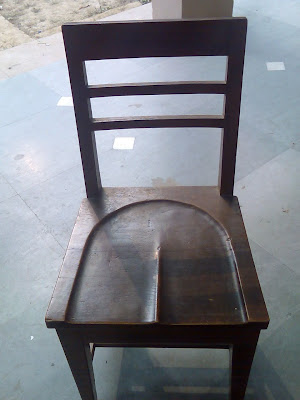
    Hips don't Lie ;)

    *********************First of all I thank my friend for sending me this pic for my blog.******************************************

    This is a marvellous piece of the architecture at University of Delhi. Though its too imaginative, a precious piece of Art, but its not present in the Faculty of Arts, University of Delhi.

    Disclosing the location will not be nice for the college’s reputation, further, it might disclose the identity of the contributor which is against his / her wish.


    signing out…
    Prev  Top

    I hope you enjoyed it. It was a first attempt and I tried my best. Writing a blog was a tough job for me, especially because I wanted to load it with lots of features and being a commerce grad, it was really tough.

    I request you guys to send me some interesting things-any incident or pic or part of your life, which you think, might be worth sharing for the ‘Contributed by Readers’ section of the blog.

    Feel free to comment below on anything and everything here. You can also visit the blog’s orkut & facebook groups for further reactions and discussions. If you would like to get the updates of the future posts, subscribe by email or feeds.